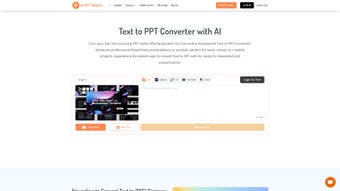

Download AIPPTMake – Free AI PowerPoint Generator, Text‑to‑Slides Converter
Overview
AIPPTMake is an AI‑driven, browser‑based tool that instantly converts plain text into fully designed PowerPoint presentations. The service is built around a sophisticated natural‑language processing engine that analyses up to 5,000 characters of input, automatically creates logical slide sections, adds bullet points, chooses fitting images, and applies a visual theme that matches the tone of the content. Because it runs entirely in the cloud, there is no need for any download, installation, or licence key – a modern web browser on any operating system is sufficient.
The platform targets a broad audience that includes students drafting lecture decks, teachers preparing classroom material, marketers assembling pitch decks, and business professionals who need to produce reports quickly. By offloading the time‑consuming design work to the AI, users can focus on refining their message rather than wrestling with layout, typography, and graphic selection. The generated file is delivered as a standard .pptx that opens seamlessly in Microsoft PowerPoint, Google Slides, LibreOffice Impress, or any compatible editor, allowing further customization if desired.
Security is a core principle: all data is transmitted over HTTPS, processed on secure servers, and automatically deleted after the conversion completes, ensuring compliance with GDPR and other privacy regulations. In short, AIPPTMake offers a fast, free, and secure pathway from raw text to polished presentation, eliminating the need for costly software subscriptions or lengthy manual design sessions.
Key Features, Pros & Cons
- AI‑Powered Content Parsing: The engine intelligently splits input into logical sections, adds headings, bullet points, and selects relevant visuals.
- Extensive Template Library: Over 20 professionally crafted templates covering business, education, technology, and creative styles.
- Unlimited Free Access: No hidden fees, subscription plans, or watermarks – every generated PPT is ready for immediate use.
- 5,000‑Character Limit per Conversion: Supports detailed outlines while maintaining fast processing times.
- One‑Click Download: Exports a .pptx file compatible with PowerPoint, Google Slides, LibreOffice Impress, and more.
- Cross‑Browser & Device Compatibility: Works on Chrome, Edge, Firefox, Safari, and mobile browsers on Android and iOS.
- Secure Data Handling: HTTPS encryption and automatic deletion of user inputs after conversion.
- Customizable Slide Order: Users can rearrange or remove slides before final download.
Pros
- Generates polished slides in seconds, dramatically cutting production time.
- Completely free with no hidden charges or watermarks.
- No software installation required; runs directly in the browser.
- High‑quality designs that look professional out‑of‑the‑box.
- Strong privacy safeguards – data is encrypted and deleted after use.
- Regularly updated template collection and AI improvements.
Cons
- 5,000‑character limit means large documents need to be split into multiple runs.
- Advanced animations, custom graphics, and complex transitions must be added manually after download.
- No dedicated native mobile app; only web access is available.
- Limited control over exact placement of AI‑chosen images.
Installation, Usage, Compatibility & Frequently Asked Questions
AIPPTMake is a cloud‑based service, which means there is nothing to install on your device. All you need is a stable internet connection and a modern web browser. The responsive interface adapts to desktop, tablet, and smartphone screens, making it fully functional on Windows, macOS, Linux, Android, and iOS platforms. Below is a step‑by‑step guide to get the most out of the tool, followed by answers to the most common questions.
Step‑by‑Step Guide
- Open the website: Go to aipptmake.com using any up‑to‑date browser.
- Enter your content: Paste or type up to 5,000 characters into the main textbox. For longer documents, split the text into logical sections and process them sequentially.
- Select a template: Browse the thumbnail gallery and pick a style that matches your audience – corporate, academic, creative, or minimalist.
- Adjust optional settings: You can fine‑tune slide count, bullet‑point density, or image inclusion to better suit your needs.
- Generate the deck: Click “Create PPT.” The AI parses the text, applies the chosen template, and prepares a preview within seconds.
- Review and edit: Use the built‑in navigator to reorder, delete, or rename slides before finalising the deck.
- Download: Press “Download PPT” to receive a .pptx file. Open it in PowerPoint, Google Slides, or any compatible editor for additional tweaks.
Frequently Asked Questions (FAQ)
Is AIPPTMake really free or are there hidden costs?
AIPPTMake is completely free for all core features, including unlimited slide generation within the 5,000‑character limit per conversion. There are no subscription fees, watermarks, or premium tiers.
Can I use the generated PPT files for commercial purposes?
Yes. The license granted by AIPPTMake allows both personal and commercial use of the exported PowerPoint files. You may sell, distribute, or present the slides as part of any business or educational activity.
What happens to my text after I generate the slides?
All user‑submitted content is processed over an encrypted HTTPS connection and automatically deleted from the server once the PPT file is created, ensuring compliance with GDPR and protecting your privacy.
Can I edit the slides after download?
Absolutely. The exported .pptx file is fully editable in Microsoft PowerPoint, Google Slides, LibreOffice Impress, and other compatible editors. You can modify text, replace images, add animations, or change the design as needed.
Is there a limit to how many presentations I can create per day?
There is no daily quota for free users. The only limitation is the 5,000‑character cap per individual conversion. For larger projects, simply split the content into multiple sections and generate each deck separately.
Conclusion & Call to Action
AIPPTMake fills a noticeable gap in the presentation‑creation market by delivering a fast, secure, and completely free AI service that transforms raw text into professional PowerPoint slides. Its intuitive interface, diverse template library, and cross‑platform accessibility make it a valuable ally for anyone who regularly prepares visual content. While the character limit and lack of built‑in advanced animations mean you’ll still need a brief post‑generation edit for highly customized decks, the time saved on layout and design is substantial.
If you’re looking to cut down the hours spent on slide formatting and focus more on the substance of your message, give AIPPTMake a try today. Click the button below to launch the web app, paste your text, and watch your ideas come to life in seconds. Remember, the download is instant, the tool is free, and your data stays private.
Review Summary
Pros:
- Rapid slide generation saves valuable time.
- Completely free with no watermarks.
- No installation required; works in any browser.
- Strong privacy and data‑deletion policy.
- Broad template selection covers many use‑cases.
Cons:
- 5,000‑character limit per conversion.
- Advanced animations must be added manually.
- No dedicated mobile app.
- Limited control over AI‑chosen imagery placement.
AIPPTMake delivers on its promise of rapid, AI‑driven slide generation. The free model, clean UI, and solid privacy practices earn high marks, while the character limit and minimal animation support keep the rating just shy of perfection.



.png)



